
A simple guide to using Netflix for your favourite TV shows and movies



Re-watching an old movie you’ve always loved once meant a trip to the local shop or Blockbuster to get the video, while catching up on a favourite series could mean waiting months for a TV re-run. But now it’s as simple as the click of a button.
Packed full of new and classic TV shows and movies as well as some highly rated original series of its own, Netflix is the perfect place to satisfy your nostalgic side, while ensuring you keep up with the new releases that your kids and grandkids are obsessing over. Imagine surprising your loved ones with your knowledge of the latest viewing trends at the next family gathering!
While Netflix is relatively simple to use, actually signing up and navigating your way around it for the first time can leave many people confused, so we’ve compiled a simple guide to get your started. After all, what’s better than a quiet night in front of the TV with your favourite show?
What’s Netflix?
The entertainment site allows users to sign up and pay a small monthly fee to legally stream thousands of shows, series episodes and movies from the internet to your viewing device. There’s no need to wait hours for a show to download, as streaming means it’s immediately available to watch as long as your internet connection is working.
What can I watch Netflix on?
There are a huge number of different devices you can watch Netflix on, as long as you’re connected to the internet or on a data plan at the time, including smart TVs, game consoles, laptops, tablets and smartphones. For the full list of devices, visit Netflix’ official devices page.
So, how do I set it up?
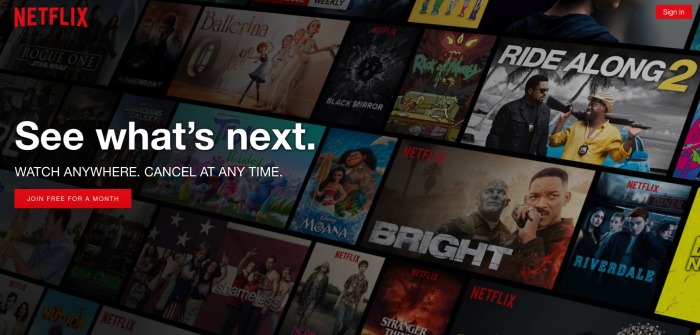
First of all, it’s important you are using a compatible device. You can check the full device list mentioned above, but as long as you’re using a smart TV (such as an Apple TV or Samsung smart TV), a smart phone, tablet or other device, then you’ll be all set.
Next up, go to the official Netflix website by typing ‘Netflix’ into Google or typing in https://www.netflix.com/au. There’s no need to worry about specifying ‘Australia’, as you will be automatically directed to your home country’s site.
Once there, you’ll currently be given an option in a big red box to ‘join free for a month’. Clicking on that will show you the different plans available, and you simply click on whichever box you wish to choose.
Choosing the right plan
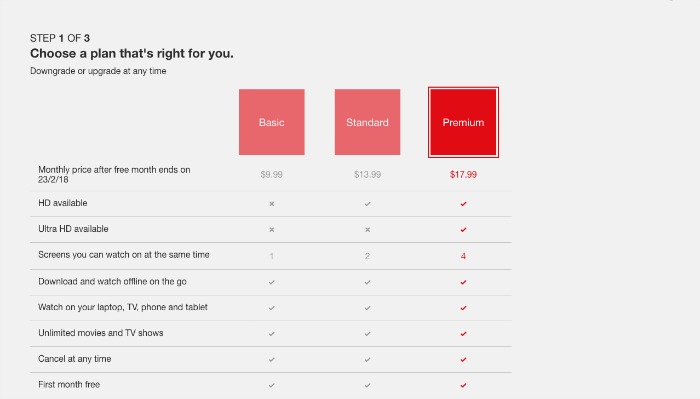
There are three separate plans available for new users in Australia. Each allows a certain amount of people on that plan to watch Netflix content at the same time, on different devices.
- The basic plan allows one user to stream Netflix at any given time for $9.99 a month
- The standard plan allows two users to stream at the same time for $13.99 a month
- The premium plan allows four users to stream at one time for $17.99 per month
If you want to watch Netflix on several devices – such as your TV, laptop and phone – at different times, then the standard package is fine. You only need a larger one if you plan to watch it on different devices at the exact same time, for example, if several family members want to watch different shows at the same time as each other.
Creating an account
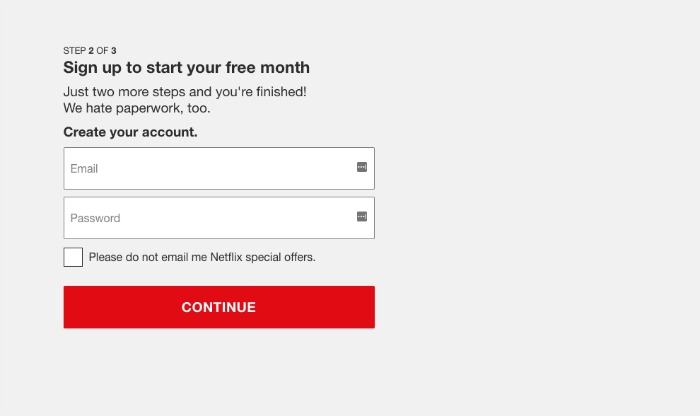
Once you’ve chosen your plan, you’ll be directed on to create your new account. You’ll be asked to enter your email address and select a new password, ensuring it’s one you can remember for when you’re signing in to your account in future.
You can decide whether or not you would like to receive special offers via the email address you’ve entered by ticking the button below it.
Entering payment options
Once you’ve clicked ‘continue’ or ‘register’, you’ll be asked to enter your desired payment method, which can either be by credit card or Paypal. It’s a secure server so there’s no need to worry about entering your details.
It’s worth considering at this stage that while the first month IS free, you’ll start getting charged for any months after that. You can cancel your subscription after one month if you don’t want to continue, though, and you won’t be charged for further months.
Setting up Netflix on your devices
While many devices such as a laptop or computer allow you to simply type in the website address to watch Netflix, some others may require you to download the Netflix app.
For iPhones or iPads, click on ‘App Store’ and search for ‘Netflix’ in the search box. The app should be the first one to appear at the top, and simply click on ‘get’ to download it for free. You’ll be prompted to enter your Apple ID password, and it will download right on to your phone or tablet from there.
If you’re using an Android, go on your ‘Google Play’ icon and type in ‘Netflix’ into the search box, before clicking ‘install’ next to the top Netflix entry.
If you’re using a smart TV, and you’re all connected up to your wireless internet, there should be a ‘Netflix’ button on your remote control. Click that, and it will take you straight through if you’re already logged in. If not, you’ll be prompted to enter your email address and password, and be directed on from there.
If you do not have a Netflix button, you can usually find the Netflix app with your other internet apps and services on the TV.
Start browsing!
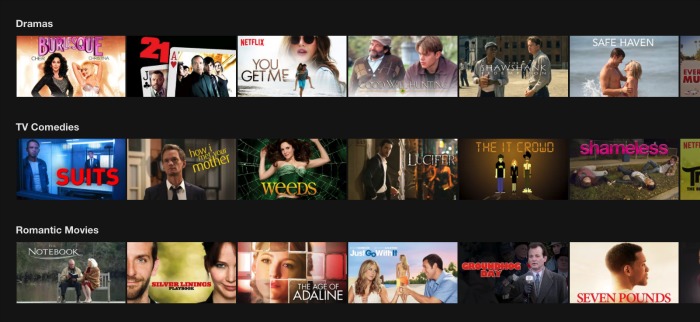
Once you’re logged in, you’ll see a screen pop up asking “who’s watching?” Just click on your registered name, and it will take you through to the main homepage.
From there, you’ll see a whole list of categories on offer ranging from ‘kids’ through to ‘action’, ‘comedies’, ‘drama’, ‘romance’, ‘trending now’ and many more. You can either scroll through them all, or filter them so you just see the ones best suited to you by using the drop down menu.
Alternatively, there is a search button at the top right where you can type in a specific TV show title or movie title, and get directed straight through to it. Just click the ‘play’ button to watch from the start, or go to ‘episodes’ to choose a specific episode of a show you want to watch.
If someone asks you to ‘Netflix and chill’ …
This is not an invitation to watch the latest episodes of your favourite series in the comfort of their lounge room. For a good few years, ‘Netflix and chill’ has been a slang term for inviting a person to partake in some casual sex, without bothering to go on a date or even pretend to be courting beforehand. In short, it’s not one to use on the grandchildren.
Happy viewing!
Do you have a Netflix account? Would you consider getting one? What’s your favourite TV show or movie?
With Facebook removing news sites from your feeds we ask that you sign up for Starts at 60’s emailers here. And to keep us on your wall, join some of our new Facebook groups and clubs:
News Junkies Club – Australia
News Junkies Club – USA
See news on the change and links to all our other clubs and groups here.





 Proudly Australian owned and operated
Comments 0
Join the conversation. Comments are reviewed before they appear.
Be the first to comment.
Join the conversation
Tell us who you are to post a comment. We'll remember you next time.